
Download RotoWire Fantasy Baseball Draft Kit 2016 – Free Mac Fantasy Baseball Draft Tool
Overview
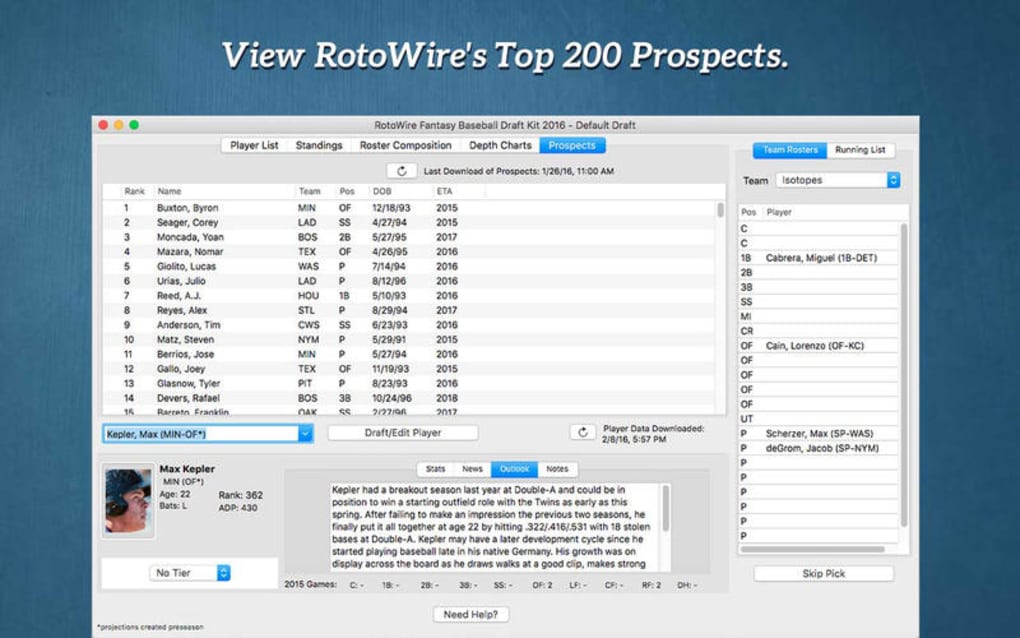
RotoWire Fantasy Baseball Draft Kit 2016 is a comprehensive, Mac‑only program created by Roto Sports Inc. for serious fantasy baseball enthusiasts who want an edge during their draft day. The 2016 edition bundles a massive database of player statistics, customizable rankings, live draft tracking, and real‑time projections, all wrapped in a sleek, Mac‑native interface. Designed for both seasoned commissioners and first‑time drafters, the kit provides everything you need to prepare, execute, and evaluate a fantasy baseball draft without leaving your desktop.
Because the software is built specifically for macOS, you’ll benefit from native performance, smooth animations, and tight integration with macOS features such as Spotlight search and Notification Center. Whether you’re playing a standard 5×5 league, a points‑based format, or a custom scoring system, RotoWire’s Draft Kit adapts to your rules and offers granular control over player values, tiers, and positional scarcity. The 2016 version also includes a “Draft Simulator” that lets you rehearse multiple draft scenarios, helping you refine strategies before the real draft begins.
Overall, the program aims to reduce the stress of draft day, increase the accuracy of your picks, and ultimately improve your season‑long competitiveness. Its user‑friendly design, extensive statistical depth, and offline capability make it a reliable companion for anyone serious about fantasy baseball on a Mac.
Key Features of RotoWire Fantasy Baseball Draft Kit 2016
- Extensive Player Database: Over 15,000 MLB players with season‑long stats, splits, and trend analysis.
- Customizable Rankings & Tier Lists: Drag‑and‑drop interface to adjust player order according to your league’s scoring settings.
- Live Draft Tracker: Real‑time updates of picks, roster spots, and remaining players during a live draft.
- Draft Simulator: Run multiple mock drafts using your league’s settings to test strategies and see how different scenarios play out.
- Auto‑Pick Engine: When you’re away from the keyboard, the software can automatically select the best available player based on your rankings.
- Position Eligibility Alerts: Instant warnings if a selected player does not qualify for a needed position.
- Offline Capability: All data is stored locally, so you can draft without an internet connection.
- Export & Import Options: Export your draft results to CSV or import custom player lists from other sources.
- Mac‑Native Design: Optimized for macOS Catalina and later, supporting Retina displays and dark mode.
- Regular Updates: Free updates for the 2016 season, ensuring you have the latest MLB stats and injury reports.
Each of these features is crafted to streamline the drafting process while giving you granular control over every decision. The Draft Kit’s modular design means you can enable or disable components depending on your workflow—whether you prefer a minimalist interface or want to explore every analytical tool available. For example, the Auto‑Pick Engine is perfect for “sleep drafts” where you’re not at your computer for the entire session, while the Draft Simulator helps you practice against virtual opponents that mimic real‑world drafting tendencies. The combination of a deep statistical engine and an intuitive UI makes RotoWire’s Draft Kit stand out among other fantasy baseball tools on the Mac platform.
Installation & Usage Instructions
Getting started with RotoWire Fantasy Baseball Draft Kit 2016 is straightforward, even if you’re not a tech‑savvy user. Follow these steps to install and begin using the software:
- Download the Installer: Visit the official RotoWire website and click the “Download for Mac” button. The file will be a
.dmgimage namedRotoWire_DraftKit_2016.dmg. - Open the Disk Image: Double‑click the
.dmgfile to mount it. A new window will appear showing the application icon and a shortcut to the Applications folder. - Install the Application: Drag the RotoWire Draft Kit icon onto the Applications shortcut. macOS will copy the program to your
/Applicationsdirectory. - Allow Security Permissions: Because the app is from an identified developer, macOS may display a warning. Open System Preferences > Security & Privacy > General and click “Open Anyway” to allow the program to run.
- Launch the Program: Navigate to your Applications folder and double‑click the RotoWire Draft Kit icon. The first launch may take a few seconds as it loads the built‑in database.
- Enter Your League Settings: Upon opening, you’ll be prompted to create a new league profile. Input your league’s scoring rules, roster slots, and draft order. The wizard will automatically generate appropriate rankings based on those parameters.
- Import Existing Rankings (Optional): If you already have a custom ranking list in CSV format, use the “Import Rankings” button to bring it into the Draft Kit.
- Run a Mock Draft: Before the actual draft day, click the “Draft Simulator” tab. Select the number of participants, draft speed, and any auto‑pick preferences. Run several simulations to see how your rankings hold up.
- During the Live Draft: Open the “Live Draft Tracker” tab. As each pick is made, the software updates the available player pool, highlights positional shortages, and suggests the next best available player based on your rankings.
- Export Results: After the draft, click “Export Draft Results” to save a CSV file. You can share this file with league members or import it into your league’s hosting platform.
Overall, the installation process takes under five minutes, and the guided setup wizard eliminates most of the guesswork. Once you’re familiar with the interface, you’ll find that the Draft Kit’s workflow mirrors the natural flow of a live draft, making it an intuitive tool for both beginners and veteran commissioners. If you encounter any issues, the built‑in Help Center provides step‑by‑step articles and a contact form for direct support from Roto Sports Inc.
Compatibility, Pros & Cons
Supported Operating Systems: RotoWire Fantasy Baseball Draft Kit 2016 runs natively on macOS 10.12 (Sierra) and later, including macOS Monterey and Ventura. The program is optimized for both Intel‑based Macs and Apple Silicon (M1/M2) devices, thanks to Rosetta 2 compatibility for older Macs. While the software is exclusively built for macOS, Roto Sports Inc. also offers a separate Windows version for users on PC, but this article focuses on the Mac edition.
Pros
- Deep statistical database covering the entire 2016 MLB season.
- Fully native macOS experience with Retina support and dark mode.
- Robust mock‑draft simulator that saves multiple scenarios.
- Auto‑pick engine for unattended drafts.
- Offline functionality ensures you can draft without internet.
- Easy import/export of custom rankings and draft results.
- Regular season updates keep player info current.
- Intuitive drag‑and‑drop ranking editor.
Cons
- Price point ($29.99) may be high for casual drafters.
- Only available for the 2016 season; older versions are not backward compatible.
- No built‑in live scoring; you need a separate platform for in‑season management.
- Lacks a mobile companion app for on‑the‑go reference.
- Initial learning curve for advanced features like custom tiering.
Despite a few limitations, the strengths of the Draft Kit—especially its offline capability and deep statistical insight—make it a worthwhile investment for anyone serious about winning their fantasy baseball league on a Mac. The pros heavily outweigh the cons, particularly for users who value a stable, native Mac experience over a free but web‑based alternative.
RotoWire’s Draft Kit delivers a powerful blend of data depth and user‑friendly design. The mock‑draft simulator saved me countless hours, and the auto‑pick feature proved essential during a late‑night draft. While the price is a bit steep, the value you receive—especially the offline database—justifies the cost for serious players.
Frequently Asked Questions (FAQ)
Can I use the Draft Kit without an internet connection?
Yes. All player statistics, rankings, and mock‑draft data are stored locally after the initial download, allowing you to draft offline without any loss of functionality.
Is the software compatible with Apple Silicon Macs?
Absolutely. The 2016 Draft Kit runs natively on Intel Macs and works seamlessly on Apple Silicon (M1/M2) through Rosetta 2, delivering the same performance and UI experience.
How often are the player statistics updated?
Roto Sports Inc. releases free updates throughout the 2016 season. Updates typically include the latest MLB stats, injury reports, and any mid‑season roster changes.
Can I import my own custom rankings?
Yes. The Draft Kit supports CSV import for custom ranking lists. Simply click “Import Rankings” in the setup wizard and select your file.
What is the refund policy if I’m not satisfied?
Roto Sports Inc. offers a 30‑day money‑back guarantee. If you encounter any critical issues or are unsatisfied with the product, you can request a full refund within 30 days of purchase.
Conclusion & Call to Action
If you’re a Mac user looking for a reliable, data‑rich tool to dominate your fantasy baseball draft, RotoWire Fantasy Baseball Draft Kit 2016 is a solid investment. Its extensive player database, powerful mock‑draft simulator, and offline capability give you a competitive edge that generic web‑based tools simply can’t match. While the price may be a consideration, the depth of features and the seamless macOS integration provide excellent value for serious drafters. Ready to elevate your draft strategy? Download RotoWire Fantasy Baseball Draft Kit 2016 now and start preparing for a winning season.







